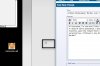
A Black Rectangular Border over my cursor

pixel1

Registered
Hi everyone, i'm in need of some assistance. I did a software update and i restarted my machine, upon the restart there is now a Black Rectangular Border around my cursor/arrow, it follows in any direction. How do i get rid of it? Remove the border?


thanks, mike
 

Attachments

  • wtf.jpg
    wtf.jpg
    122 KB · Views: 5
Go to System Preferences, click on "Universal Access", then click on the Options button in the Zoom settings. There'll be a check box there labelled "Show preview rectangle when zoomed out". Uncheck it and your border should disappear.
 
Back
Top