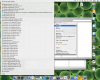
Hi. I've started work at an organization and they have me on a Mac, which so far I love, but maybe it's just the machine I'm on, but trying to open my .psd file in Photoshop instead of Preview seems a daunting task (see attachment).
I'm not interested in making Photoshop the default file opener for .psd's (I like how quick the Preview program is to load), but I would like to know how I can trim this "Open With" list down (whether I need to uninstall some of this or just take all these .exe's out of the list).
Thanks for any advice on how to do this,
--Allen
I'm not interested in making Photoshop the default file opener for .psd's (I like how quick the Preview program is to load), but I would like to know how I can trim this "Open With" list down (whether I need to uninstall some of this or just take all these .exe's out of the list).
Thanks for any advice on how to do this,
--Allen