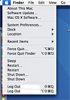
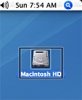
I've been using macs since 1985 and that's the first time I've seen this. The Apple menus restart, shutdown and Log Out are duplicated. Force quit has a little brother called force quit finder. This is what happens: when I log in, everything is normal for a few seconds then there's a blink on the screen and it looks like the finder is duplicating itself... don't know how else to explain it. When I click on an icon, in any view (icon or file), the selected file is highlighted with a black outline around it. same thing when I start in safe mode. Like there's a ghost file behind the file. I have run disk utility repair, repaired permissions, used tech tool pro that found minor finder errors and repaired them. Ran virus software, no virus... When I shut down and restart, no chime sound... As if there was another user that does not log out completely. other than that everything is fine. Can't remember for sure what I was doing when this first happened. I think I was converting an avi file to divx using toast titanium and it was so slow I cancelled the process, and after that I'm pretty sure this is when all hell broke loose - sort of -
I have a 20" Imac Intel 10.4.6 that's not even a month old.
I'm baffled. And very annoyed. I really don't want to reinstall system, I barely finished installing most of my softwares. Anybody who has an idea, please share it!
-- screen shots attached --
I have a 20" Imac Intel 10.4.6 that's not even a month old.
I'm baffled. And very annoyed. I really don't want to reinstall system, I barely finished installing most of my softwares. Anybody who has an idea, please share it!
-- screen shots attached --