
Floating dictionary problem

Mikuro

Crotchety UI Nitpicker
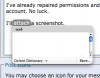
Since a few days ago, my the little floating dictionary I get when I hit command-control-D while hovering the mouse over a word has not been working properly. It appears, and it shows the scroll bar and the word's type, but not the definition. There's just no text there.

I've already repaired permissions and tested with a different user account. No luck.

I'll attach a screenshot.

Any idea how to fix it?
 

Attachments

  • blankdictionary.png
    blankdictionary.png
    20.1 KB · Views: 7
This happened to me with dashboard's language converter. Apparently, it could not contact the server that gives it the definitions (acctualy, it's happening now). Is their any chance that the webster server is just too busy?
 
Does the dictionary floater use an online service? I thought the database was stored locally. I'm pretty sure the Dictionary application (which works fine for me) uses a local database, and I assume the floater uses the same thing. I can't spot any attempted network connections when using either, anyway. Hmm.
 
well, then is it possible the local databases have been deleted? You might want to use pacifist to re-install the dictionary packages. They are in the mac os x install package, under the package name of oxforddictionarys.pkg. Then, use the dictionarys on your install disk to replace those on your hard drive, the dictionarys on your hard drive are at /Library/Dictionarys
 
Good idea, but no dice. :( I took the Dictionary.app and the Dictionaries folder from my 10.4.0 DVD, but the problem remains. (I discovered that the Dictionary floater is in fact a part of Dictionary.app. It's located within the app's bundle.) I also re-downloaded the 10.4.4 combo updater and tried to manually insert the new files into the old Dictionary, but again, no dice.

Actually, it's even worse now. Before, it at least properly displayed the word's part of speech, but now even that is blank. Hmm.

The Dictionary app itself still works fine. It's just the floater that has problems.

I'm at a real loss here.
 
Well, I don't know why, but it's working again. :D The problem persisted for a few days after I updated to 10.4.5. Then the part of speech came back in the popup, and after a couple more days, the whole thing was working fine again. I don't know why.

The best I can figure is that it has something to do with Dashboard. I used Dashboard for the first time in a month or so a few days ago, and then the next time I tried my dictionary floater, it worked. I can't prove a connection, but it's the only theory I have. (I don't even have the dictionary widget open, though, so I don't know if it could be involved.)

*shrug*
 
Back
Top