You are using an out of date browser. It may not display this or other websites correctly.
You should upgrade or use an alternative browser.
You should upgrade or use an alternative browser.
how do you show the space free in an icons title
- Thread starter Browni
- Start date


brianleahy
Colonel Panic
It seems like there is a way to do this...
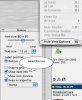
I'm not at my Mac right now, but have you checked the Finder "View Options" for the Desktop itself? Seems like I recall a check-box there which does something like that...
I'm not at my Mac right now, but have you checked the Finder "View Options" for the Desktop itself? Seems like I recall a check-box there which does something like that...

ElDiabloConCaca
U.S.D.A. Prime
Click on your Desktop so that the Finder is active. Choose "Show View Options" from the "View" menu (or hit command-J). Check "Show item info."