SLowww all of a sudden?? but why?

antonioconte

Registered
My powerbook has suddenly started to act really slow, i.e flicking from one app to another, there's a delay. Entourage is slower as well. so, opening up folders is slow as well - any ideas?

 
I assume you are on panther. This very important information together with your system specs is missing in your post..
Repair permissions few times in a row until no error is reported. Did that help?
 
I actually did that last week on Friday, and I also ran Nortons Disk straight after with Disk Doctor as well. This slow problem happened On Monday of this week. Yes I am using Panther 10.3.6 on a 17" Powerbook, 1.33ghz 1.5GB ram
 
Ohhhhhh, Norton... This company scares me. Many ppl in this forum will support me with this when I say that Norton tends to mess up instead of repair anything.
Setup a new user account and see how your system performs. Is it a lot faster?
 
I thought Norton didn't support Panther? You might want to check that out since many on this board swear at Norton.

As for the slowdown you're experiencing, you might want to check out the L2 cache setting. Go to System Preferences->Hardware and make sure that L2 cache is enabled.
 
I've justed checked an d I have version 8 nortons which according to Nortons runs ok on 10.3.6. Regadring the L2 I can't see the hardware setting in System preference??
 
It should be there, under the major group Other, right at the bottom with a symbol of a CPU.
 
Yea...Norton products on OS X are...what's a nice way to put it...JUNK.

How is your disk space holding up? I notice similar problems whenever mine falls below 25% free. OS X doesn't like full drives.
 
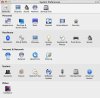
Here's a screenshot of my System Preferences app. Hardware is at the bottom. I've got no idea why you don't have Hardware as an option.
 

Attachments

  • Picture 1.jpg
    Picture 1.jpg
    53.3 KB · Views: 19
I've never seen that in any of the OS X based computers I've used. Chances are if it was a standard Apple pane, it would be in a category other than OTHER (probably HARDWARE).
 
Well, it was on the Powerbook i got and I haven't installed any additional software to handle the cache. Plus, I have performed a complete system restore with the provided discs too, so I know what I put on it and I didn't put anything extra.

Perhaps the new Powerbooks come with some tool to control the cache?
 
Back
Top