
What Does This Keychain Message Mean?

Amie

Mac Convert for Life
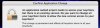
Hi. I'm hoping someone can answer my question: I use my laptop at different wi-fi hotspots, so I'm always going back and forth and have different hotspots and passwords for each. Sometimes I get this message (see attached), and I'm not sure what it means. I always click "Don't change." And then another message pops up and asks me if I want to allow AirPort to use my keychain for so-and-so network. I always click "Always allow." These messages keep returning every time I return to that same hotspot. Can someone please explain and tell me what the first message means? I once clicked on the "Details" button at the bottom of the message and it said something about "all keychains will be affected and changed permanently." I don't like the sound of that. Which why I keep clicking "Don't change."
 

Attachments

  • Picture 2.jpg
    Picture 2.jpg
    22.5 KB · Views: 22
I get similar messages if an app is upgraded, and the new one want's my keychain. Does this happen after updates?
 
I get similar messages if an app is upgraded, and the new one want's my keychain. Does this happen after updates?

Hmm ... not sure if it's update-sensitive or not. I don't *think* it is. I haven't done an update lately, and it just gave me that message again before I could type in the password and sign on. I keep clicking "Don't change," so I guess the messages will continue popping up every time I visit that hotspot. Have you ever clicked "Change"? I'm afraid to, as I don't want to mess up anything.
 
Click 'change'

It's due to a system software update, which also updated your Airport software. It's just asking to update your keychain with the updated access info. The message should not return after clicking 'change'. It's also saying that the change is permanent (until the next update/change, of course)

OR, you can choose to continue to be annoyed by that message. :)
 
I second this. I've gotten this message when I've updated the operating system. After I've updated, anything that is requiring access to the Keychain pops up this message. Selecting Change updates everything and the message doesn't come up again.
 
As far as I can tell. It's just a password manager program asking to transfer passwords associated with the older version to the updated version. Shouldn't be a big deal if you are already using it.
 
Thank you so very much for the replies and explaining it to me! I'm going to click "Change" next time I get that annoying message. Thanks again.
 
Just wanted to say: Thanks for the help on this. I finally clicked "Change All" and everything is swell. And whenever I visit various hotspots, I never get that annoying message anymore. Until the next update, that is. Anyway, thanks!
 
Back
Top