
You are using an out of date browser. It may not display this or other websites correctly.
You should upgrade or use an alternative browser.
You should upgrade or use an alternative browser.
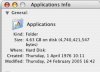
1976 eh?!
- Thread starter Convert
- Start date


DeltaMac
Tech
Lots of possibles
-Your system time and date were not set properly when the folder was originally installed.
-The installer provided a bogus date and time.
-You have a really old version of OS X
-Some cameras create .jpg files with really strange creation dates.
-Some glitch in the System caused dates and times to change on commonly used folders (could happen with some older 3rd party disk repair tools (Oh, your time and date appear to be incorrect. Do you want to repair it? Click OK)
-Time and Date on some folders are different for other unknown reasons that only a mother could know.
-Maybe an invalid creation date can safely be ignored. An invalid modified date could indicate a problem with a backup battery.
Must be other possibilities too numerous for me to think of.
-Your system time and date were not set properly when the folder was originally installed.
-The installer provided a bogus date and time.
-You have a really old version of OS X
-Some cameras create .jpg files with really strange creation dates.
-Some glitch in the System caused dates and times to change on commonly used folders (could happen with some older 3rd party disk repair tools (Oh, your time and date appear to be incorrect. Do you want to repair it? Click OK)
-Time and Date on some folders are different for other unknown reasons that only a mother could know.
-Maybe an invalid creation date can safely be ignored. An invalid modified date could indicate a problem with a backup battery.
Must be other possibilities too numerous for me to think of.


Well, this is funny. Even my partitions show the creation being done on April 1, 1976. I got the hard drive in December 2004.. So I'd say it might be our systems have once come so empty that the time has reset to 1976?
It's still not as bad as a server where I was hunting for some Newton software a few months back. It showed modified data to be in 1904.
It's still not as bad as a server where I was hunting for some Newton software a few months back. It showed modified data to be in 1904.

ElDiabloConCaca
U.S.D.A. Prime
Seems logical that the OS X installation was done without an internet connection, so the system clock probably wasn't automatically set right.
DeltaMac
Tech
That date in 1904 is not hard to explain. Default date (battery has died or been removed, allowing certain settings to revert to defaults) for many older Macs is Jan 1, 1904. Many newer Macs default to 1969. I don't think it's related to any particular computer events, just how the date code is stored.